Invite-only for now
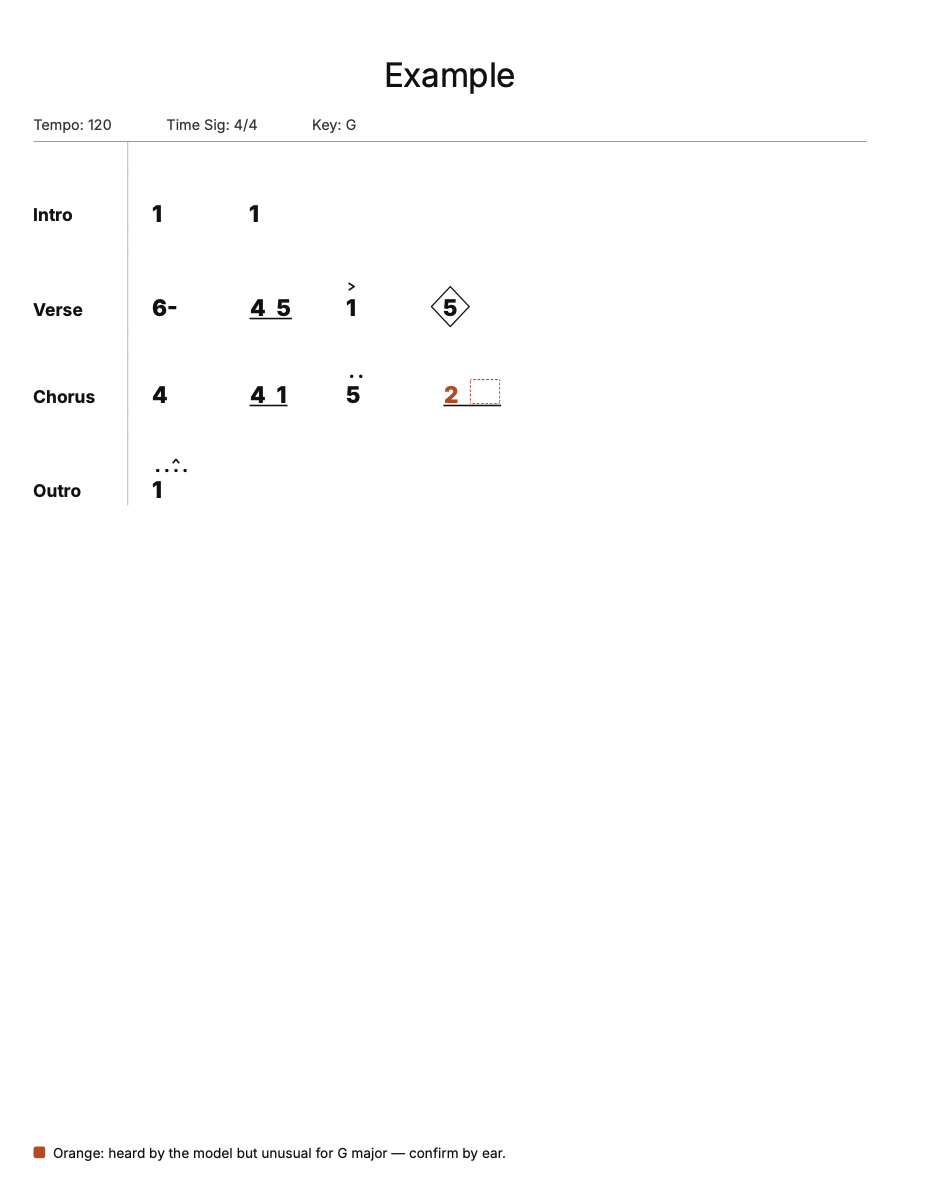
Nashville number charts from any recording.
Upload a song and enter its key. Headchart detects the beats, sections and chords and lays them out as a printable number chart. You check it by ear, fix what's off, and hand it to the band.
We'll email you when you can try it.

How it works
Three steps from a recording to a chart on the music stand.
-
1
Upload a recording
Any song with drums. The beats and downbeats set the bars, and the song's sections become the chart's sections.
-
2
Enter the key
Major or minor. Chords are numbered from it, and minor keys are charted in the relative major.
-
3
Check, fix, print
Edit any chord, add pushes, diamonds and stops, then print or download the PDF.
It prints what it heard, not what it guessed.
A chord that's unusual for the key prints in orange and is listed under "Check by ear", so you know exactly which bars to listen to.
Where nothing was detected, the chart says so (N.C. or an empty slot) instead of filling in a confident guess.
Rehearse with the recording.
The chart follows the audio bar by bar. Rehearsal mode plays one section at a time, with a count-in, a metronome that clicks on the band's real beats, a loop and slower speeds.

Your charts, ready for the gig.
Find any chart in your library, group them into setlists in set order, and tag them however you like.

Get on the list
Headchart is invite-only for now. Leave your email and we'll let you know when you can try it.